
There are two screens you may see after booking. One appears on the spot right after you confirm a booking; the other appears when you come back after paying on the card screen. They show different wording, so here's how to read each of them.
The screen right after booking
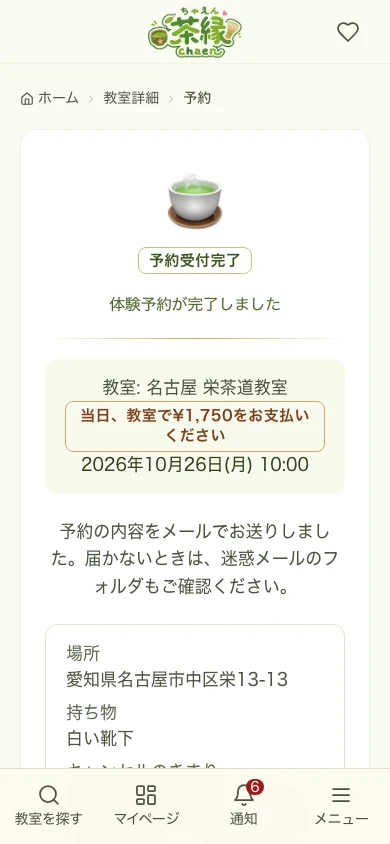
Once you see "Your trial lesson is booked" or "Your booking is complete", your booking has been received.
- What to pay on the day: for bookings paid at the classroom, it says "Please pay … at the classroom on the day". Bring that amount with you
- If you see "Your trial request has been received" or "Your booking request has been received", the booking is confirmed once the classroom owner approves it
- If you see "Payment status: awaiting payment", your card payment is not finished yet. Complete it with the "Pay by card" button on the booking card in the dashboard (the dashboard is in Japanese only)
- For a trial booking you'll see two buttons, to check your booking status and to contact the classroom. For a regular lesson you'll see buttons to open the dashboard and to book the next date
- A booking confirmation email is also sent
- For the exact date/time or to change or cancel your booking, check the dashboard
Coming back after paying by card
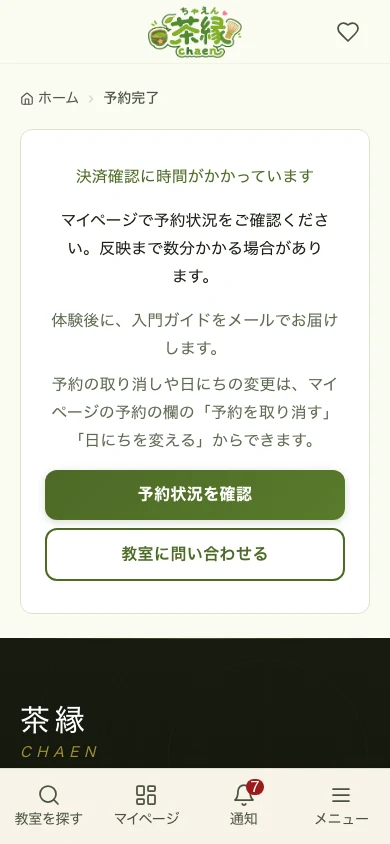
When you come back after paying on the card screen, the heading tells you how the payment check is going.
The heading changes with the situation:
- "We're confirming your payment" — still checking. Please wait without closing the screen
- "Your payment is complete" / "Your trial lesson is booked" — the booking is settled
- "Please wait for the classroom's approval" — an approval-required classroom. No payment is taken until approval
- "We're waiting for your payment" — approved, but the payment is unfinished. Complete it from the dashboard
- "Payment confirmation is taking a while" — it can take a few minutes to appear. Check your booking status in the dashboard
If you press "Back" or close the card screen partway, nothing is charged. Back on the booking screen you can choose "Continue to payment" or cancel the booking and choose another time. If you do neither, the booking is cancelled automatically after the time shown.
What to do next
- The dashboard — check your booking details (date/time and classroom name) there
- Check what to bring and any notes for the day in the dashboard or on the classroom's detail page
- If you need to cancel, use the "Cancel booking" button in the dashboard
- To change the date or time, use the "Reschedule" button on the booking card in the dashboard to move to another open slot at the same classroom. If no slot is open, cancel and book again
If you open this screen later
If you open this screen later from a bookmark or your history, rather than right after paying, there is nothing to check, so it may say "Payment confirmation is taking a while". That does not mean your booking failed.
If you run into trouble
If you saw the booking success screen but didn't receive a confirmation email, or want to change your booking, please contact us using the links below.